
Which Industrial Workbench Actually Fits Your Workflow?
If you’ve shopped for an industrial workbench, you’ve noticed the problem. The options blur together. Steel frame. Laminate top. Some have drawers. Some don’t. Some adjust. Some stay fixed. It’s hard to tell which one fits what your team actually does versus which one just looks sturdy in a photo.
The workbenches that hold up over time aren’t chosen by size or price. You choose them by matching three things: the weight and type of work on the surface, whether one person or a whole shift uses it, and how much the setup needs to flex as tasks change. Once you answer those three questions, the right bench becomes obvious.
What Makes an Industrial Workbench Different From a Regular Desk?
A regular desk handles light use: a laptop, some paperwork, maybe a phone. An industrial workbench takes a beating instead. It holds heavier equipment. It absorbs vibration from tools or machinery. It survives years of daily wear without the surface warping or the frame loosening.
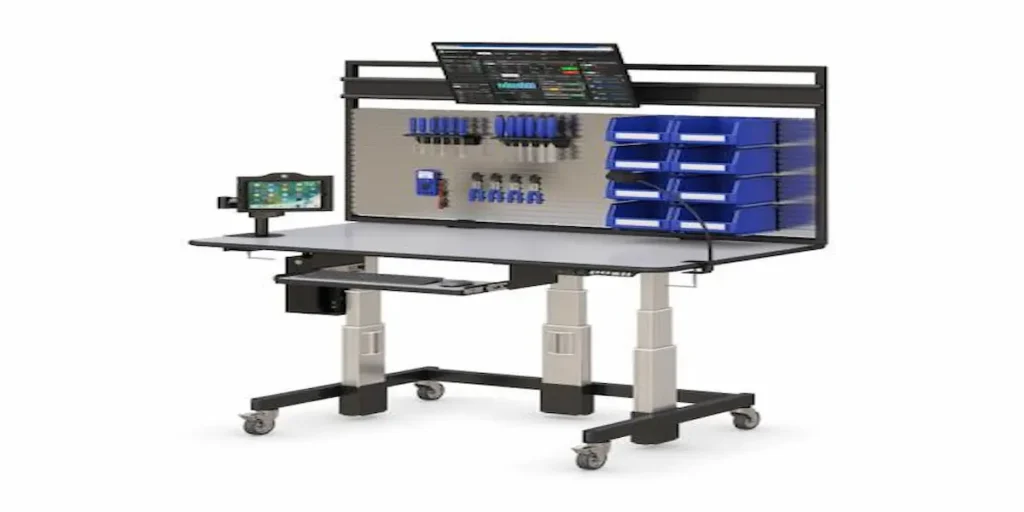
If your team does assembly work, runs diagnostics, repairs equipment, or handles anything heavier than a standard office setup, a workbench does a fundamentally different job than a desk ever could. The industrial workbench station with computer display fits that exact use case. It pairs a heavy-duty surface with an integrated display, so one station handles both physical work and digital tracking without needing two separate setups.
Do You Need a Height-Adjustable Workbench?
This is usually the first real decision. It comes down to who uses the bench and how often.
If one person uses the station all day, every day, a fixed-height bench set to their comfort works fine and costs less. But say the bench rotates across shifts. Or the work itself shifts between sitting and standing tasks throughout the day. Adjustability stops being a nice-to-have. It becomes the thing that prevents strain and slowdowns.
The height-adjustable workbench with electronic controls solves this with a simple electronic adjustment instead of a manual crank. That matters more than it sounds when someone’s mid-task and needs to change position fast.
How Much Weight Does Your Workbench Need to Hold?
This is the number people skip past, and they regret it later. A bench that looks solid can still fail under load if it wasn’t built for what you actually put on it: test equipment, dense materials, or multiple monitors and a CPU housing stacked on top.
Before you choose a bench, walk through what will realistically sit on it on a normal day, not just the lightest day. Does the answer include heavier tooling, diagnostic equipment, or a permanent computer setup? Then look for a bench built specifically to carry that combined load. Don’t settle for one marketed as general-purpose.
Where Does a Workbench Fit Compared to Other Workstation Options?
A workbench isn’t always the right answer. It helps to know when it isn’t.
Does your team move between stations rather than stay in one place? A mobile cart system fits better than a fixed bench. Is floor space the real constraint rather than task type? A wall mounted computer desk solves that problem more directly. Does the equipment on the bench need protection from dust or moisture? Pair the bench with computer cabinets built for controlled environments to round out the setup.
A workbench earns its place when the work is heavy, stationary, and ongoing. Outside of that, one of the other formats usually fits better.
What Does a Real Workbench Setup Look Like on the Floor?
In most facilities, a workbench doesn’t sit alone. Pair it with a monitor, sometimes on a ceiling mounted monitor arm if overhead space allows it. Tuck the CPU into a nearby housing to keep it off the work surface entirely. That combination keeps the bench itself clear for the physical task, whether that’s assembly, repair, or testing, while still giving the operator full access to whatever software or tracking system they need.
Frequently Asked Questions
What is the difference between an industrial workbench and an industrial workstation?
A workbench is the heavy-duty work surface itself. A workstation includes the bench plus a monitor, CPU housing, and adjustability features working together as one setup.
Can an industrial workbench hold a computer monitor and CPU?
Yes. Workbenches designed as full stations, like the industrial workbench station with computer display, integrate a monitor and CPU housing directly into the surface without sacrificing workspace.
Is a height-adjustable workbench worth it for a shared station?
For any bench used across multiple people or shifts, height adjustability usually earns back its cost. It reduces strain and lets each user work comfortably without manual reconfiguration.
How much weight can an industrial workbench typically hold?
Weight capacity varies by model. Heavy-duty industrial workbenches generally hold significantly more than office furniture, including test equipment, tooling, and full computer setups combined.
When should I choose a mobile cart instead of a fixed workbench?
Choose a mobile cart when your team needs to move between stations throughout the day. Choose a fixed workbench when the work happens consistently in one location.