
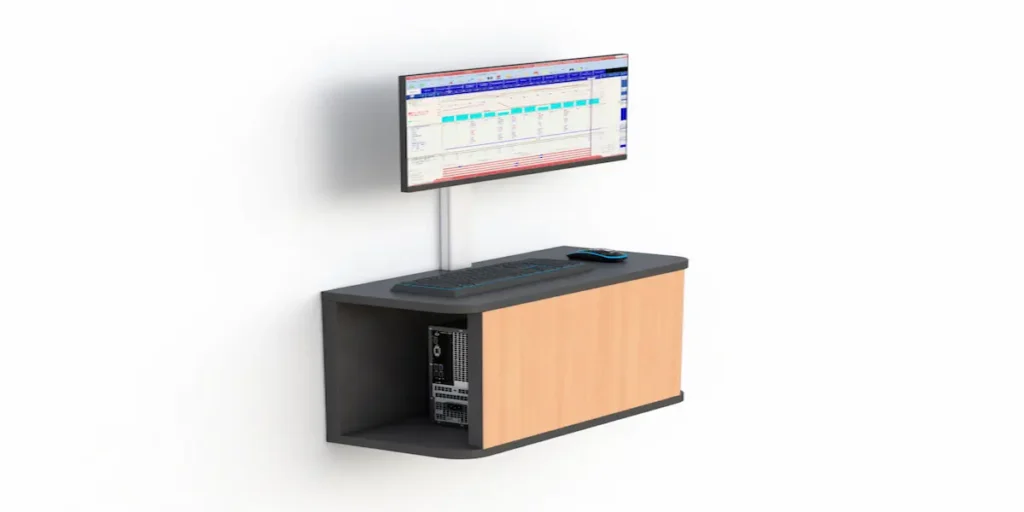
What Components Make Up a Computer Wall Mount System?
When people search for a computer wall mount, they’re usually picturing a single bracket holding a monitor to a wall. In practice, a full wall-mounted computer setup is rarely just one piece. It’s a small system of components, each handling a different part of the equipment. Knowing which ones you actually need makes a big difference in how the final setup performs.
Before deciding on a specific product, break down what you’re actually mounting: the monitor, the keyboard and input devices, and the CPU itself. Each has different requirements. Treating them as one combined decision usually leads to a cleaner, more functional station.
What Are the Main Components of a Wall-Mounted Computer Setup?
A monitor arm or bracket. This holds the screen itself and determines how much the display can tilt, swivel, or extend from the wall. Depending on the layout, this might be a simple fixed arm or part of a ceiling mounted monitor arm system if the setup needs to travel along a track rather than stay in one fixed spot.
A keyboard tray or work surface. Not every wall-mounted setup needs one. But if someone will be typing regularly at the station, a fold-down tray or small integrated surface keeps the keyboard at a usable height without needing a full desk.
A CPU mount. This is the piece most people forget to plan for. A dedicated CPU wall mount secures the tower to the wall or a nearby bracket, keeping it off the floor and out of the way, separate from the monitor bracket itself.
Do You Need All Three Components, or Just Some?
This depends entirely on how the station gets used. A quick-reference terminal that someone glances at occasionally, without regular typing, might only need a monitor bracket. A full workstation where someone sits or stands to work for extended periods usually needs all three components working together: monitor, keyboard surface, and CPU housing.
Facilities sometimes buy just a monitor bracket and add a keyboard tray or CPU mount later as an afterthought. That often leads to mismatched hardware that doesn’t move or adjust together properly. Planning all three components at once, even if you purchase them separately, avoids that problem.
How Does a Computer Wall Mount Differ From a Full Wall Mounted Desk?
This is a common point of confusion. A wall mounted computer desk is a single integrated unit: a surface with mounting points built in for the monitor and often the CPU as well. A computer wall mount system, by contrast, is more modular. You install individual brackets and mounts separately on the wall rather than as one combined desk unit.
The modular approach tends to work better in facilities that need flexibility, since you can reposition or swap components independently. An integrated wall mounted desk tends to work better where the layout is fixed and unlikely to change.
What Should You Check Before Installing These Components?
A few things matter regardless of which components you’re combining:
- Wall structure and anchor points. Every bracket, whether for a monitor, CPU, or keyboard tray, needs a secure structural anchor, not just drywall.
- Cable routing between components. If the monitor, keyboard, and CPU sit on separate mounts, plan how cables will run between them without creating a tangled mess or a trip hazard.
- Range of motion. Confirm the monitor bracket’s reach and the keyboard tray’s fold-down clearance actually match how the person will stand or sit while using the station.
- Environmental exposure. In dusty or humid environments, pair the CPU mount with an enclosed computer cabinet rather than leaving it exposed on an open bracket.
Which Industries Rely Most on Modular Wall Mount Systems?
Modular wall mount setups show up most often in facilities where the layout needs to flex over time: control rooms being reconfigured as equipment changes, production lines being retooled between product runs, or shared spaces where different teams use the same wall-mounted terminal for different purposes throughout the day. In these environments, the ability to adjust or replace one component without redoing the entire station is worth more than the simplicity of a single integrated desk.
Frequently Asked Questions
Is a computer wall mount the same as a wall mounted computer desk?
Not exactly. A wall mounted desk is a single integrated unit with built-in mounting points, while a computer wall mount system is modular, with separate brackets for the monitor, keyboard, and CPU installed independently.
Do I need a separate CPU mount if I already have a monitor bracket?
Yes, if the CPU tower needs to be off the floor as well. A monitor bracket only supports the display, so a dedicated CPU wall mount handles the tower separately.
Can a computer wall mount system be reconfigured later?
Yes, that’s one of its main advantages over an integrated desk. You can typically reposition or replace components like the monitor bracket or CPU mount without affecting the rest of the setup.
What industries use modular computer wall mounts most?
Facilities with layouts that change frequently, such as control rooms, production lines between retooling cycles, or shared multi-use spaces, tend to benefit most from modular wall mount systems.
Does a computer wall mount need a keyboard tray?
Only if someone will be typing regularly at the station. Quick-reference terminals used briefly throughout the day often only need a monitor bracket.